
When and how often
Schedules, frequency, priority and the workspace's interruption limits.
Schedule
By default an item shows as soon as it's published (Immediate). Choose Scheduled to start it at a date and time instead, in a time zone you pick. Turn on Force Timezone to use that time zone for everyone; otherwise each person's own local time is used.
Schedules decide when an item starts. To stop one, unpublish it.
Frequency
Frequency caps how often one person sees an item.
- Tours: Show Once, Always Show, Every Visit, Every N Visits or Every N Days.
- Tooltips and banners: Once, Daily, Weekly or Custom (a number of times, a number of days apart).
- Surveys: set in their Frequency & priority section.
"Once" means once per person: after they've seen, completed or dismissed it, it doesn't come back. For people your app identifies, that holds across their browsers and devices.
Priority
When several pop-ups could show on the same page, the one with the highest priority goes first. Set it in Goal & experiment (or Audience & priority): Low (25), Normal (50), High (75), or a Custom value from 0 to 100. Ties go to whichever was published first.
Interruption limits
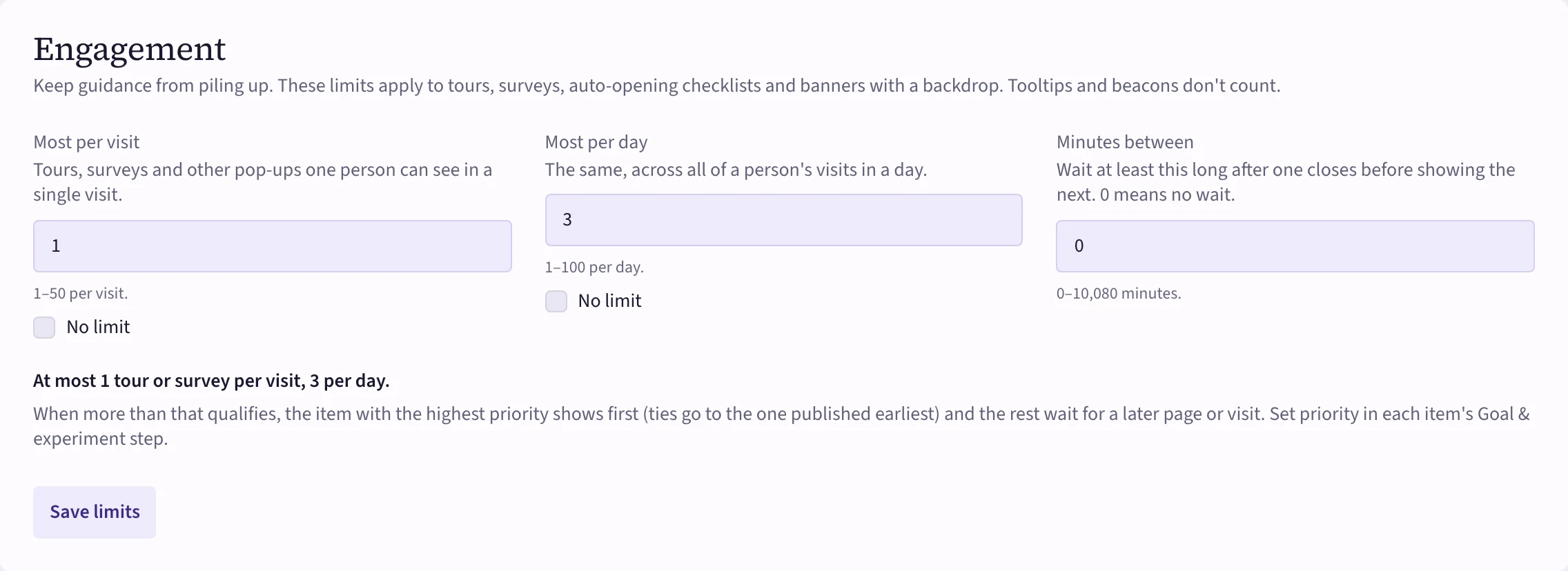
Your workspace limits how many pop-ups one person gets, so guidance never piles up. Open Settings → Workspace → Engagement:
- Most per visit — tours, surveys and other pop-ups in one visit (1–50, or no limit).
- Most per day — the same across a day's visits (1–100, or no limit).
- Minutes between — how long to wait after one closes before showing the next (0 means no wait).
 (opens the full-size image)
The limits count tours, surveys, auto-opening checklists and banners with a backdrop. Tooltips, beacons and banners without a backdrop don't count. When more items qualify than the limits allow, the highest priority shows first and the rest wait for a later page or visit.