
Tour and checklist funnels
See how far people get, and where they drop off.
Every item has its own analytics page. Open it from Analytics → Top guidance: each row has an Open analytics button.
It shows the item's Performance for the period, impressions per day, and for tours and checklists a funnel.
Tours: the step funnel
Step funnel shows how many people saw each step, and the share who left before the next one.
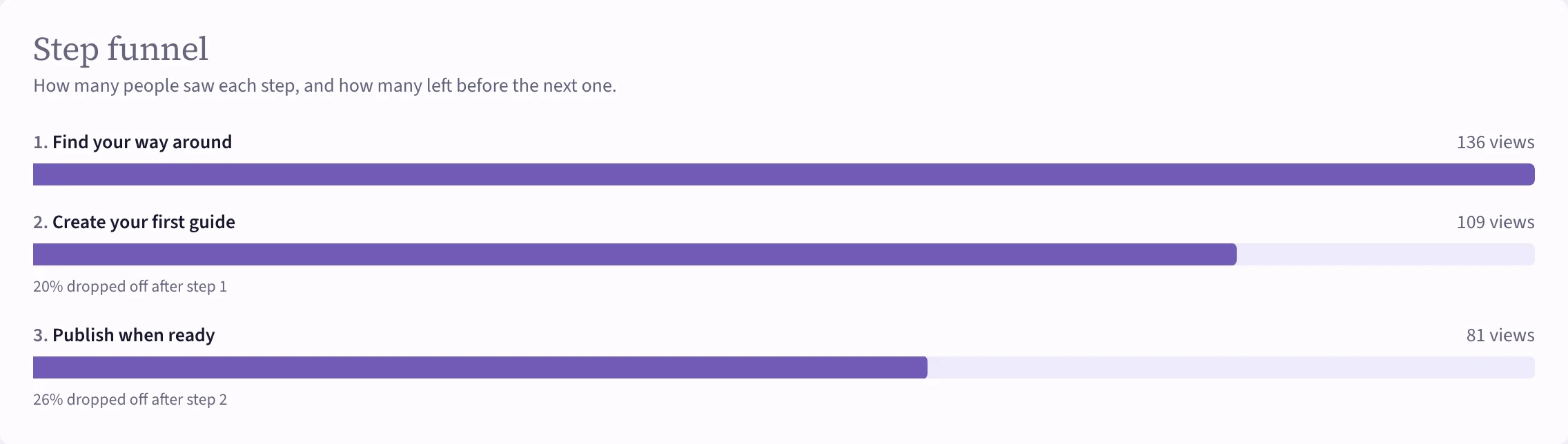 (opens the full-size image)
A big drop after one step usually means that step asks too much, points at the wrong thing, or the tour is too long. Try shortening it, rewording the step before the drop, or splitting the tour in two.
Checklists: the item funnel
Item funnel shows how many people saw the checklist, how many finished it, and how many completed each item. An item few people complete is often unclear, or hard to do without help. A tour started from that item can fix it.
Goals
If the item has a goal and a control group, its page also shows whether it changes what people do. See Goals and experiments.